Items in blog view are staggered

More
9 years 5 months ago #63741 by Woodzy42
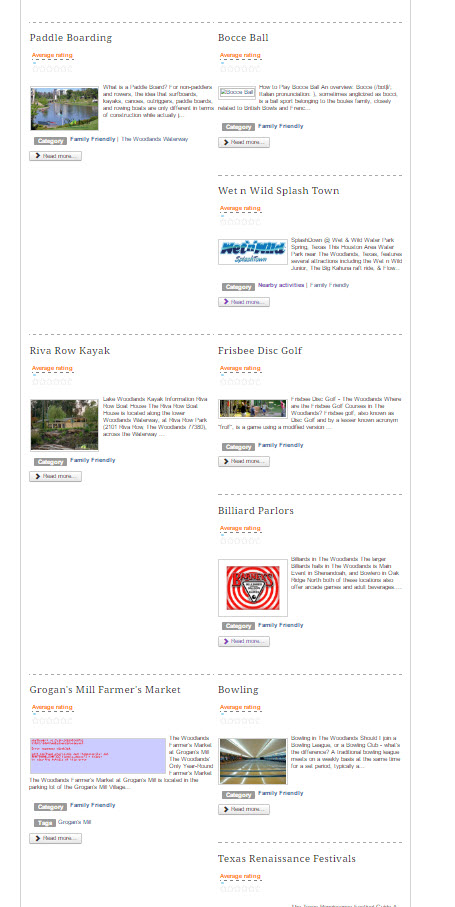
Items in the category view are staggered. The placement seems to vary between refreshes of the same page and in different browsers.
Is this a flexicontent issue and if so, how can this be resolved?
See attached image

Please Log in or Create an account to join the conversation.

More
9 years 5 months ago #63743 by ggppdk
Hello

Joomla version and FC version ?

do you use the unmodified blog template or an not modified copy of it by "duplicate" in backend ?

you may post a link to the page


-- Flexicontent is Free but involves a big effort on our part.
Like the our support? (for a bug-free FC, despite having a long list of functions) Like the features? Like the ongoing development and future commitment to FLEXIcontent?
-- Add your voice to the FLEXIcontent JED listing with a 5-star review. Thanks!

Please Log in or Create an account to join the conversation.

More
9 years 5 months ago #63776 by Woodzy42
I'm on the most current versions of Joomla v3 and FC
I've hidden a couple of items in the backend template
- blog items -> display parameters
created date/time, revisor name, and show favour are set to hide
No changes to blog category

I'm also seeing an issue with the next page function.
I've tried to set categories to view 10 items per page but, they all show multiple pages as being available and clicking on next page just refreshes the first page.
this category -> http://###thewoodlandsguide.com/things-to-do/winter only has 7 items in it.
this category ->http://###thewoodlandsguide.com/destinations/restaurant-guide has over 300 items.

I have some other questions as well but, am hoping that getting these resolved will also resolve the other issues at the same time.
Thanks!

Please Log in or Create an account to join the conversation.

More
9 years 5 months ago #63780 by micker
most current isn't good information ... 3.0.15 , 3.1 RC ?

FLEXIcontent is Free but involves a very big effort on our part.
Like the our support? (for a bug-free FC, despite being huge extension) Like the features? Like the ongoing development and future commitment to FLEXIcontent?
-- Add your voice to the FLEXIcontent JED listing reviews. Thanks![/size]

Please Log in or Create an account to join the conversation.

More
9 years 5 months ago #63785 by Woodzy42
3.1.0-rc2
PHP Built On Linux res180.servconfig.com 2.6.32-673.8.1.lve1.4.3.1.el6.x86_64 #1 SMP Thu May 5 16:06:47 EDT 2016 x86_64
Database Version 5.6.29-log
Database Collation latin1_swedish_ci
Database Connection Collation utf8mb4_unicode_ci
PHP Version 5.5.38
Web Server Apache
WebServer to PHP Interface cgi-fcgi
Joomla! Version Joomla! 3.6.2 Stable [ Noether ] 4-August-2016 23:41 GMT
Joomla! Platform Version Joomla Platform 13.1.0 Stable [ Curiosity ] 24-Apr-2013 00:00 GMT
User Agent Mozilla/5.0 (Windows NT 6.1; WOW64) AppleWebKit/537.36 (KHTML, like Gecko) Chrome/52.0.2743.116 Safari/537.36

Please Log in or Create an account to join the conversation.

More
9 years 5 months ago #63786 by Rooney
Do you have a link to the page?
Rooney

Joomla! 3.9.24 and FC 3.3.9

Please Log in or Create an account to join the conversation.

More
9 years 5 months ago - 9 years 5 months ago #63791 by ggppdk
Hello

i had asked you to post a link to see this

if link should not be public,

then you may send me a PM for this


-- Flexicontent is Free but involves a big effort on our part.
Like the our support? (for a bug-free FC, despite having a long list of functions) Like the features? Like the ongoing development and future commitment to FLEXIcontent?
-- Add your voice to the FLEXIcontent JED listing with a 5-star review. Thanks!
Last edit: 9 years 5 months ago by ggppdk.

Please Log in or Create an account to join the conversation.

More
9 years 5 months ago #63792 by Woodzy42
I did post a link, two of them in fact in message 63776
www.flexicontent.org/forum/61-troublesho...staggered.html#63776

Please Log in or Create an account to join the conversation.

More
9 years 5 months ago #63793 by ggppdk
Hello

do you mean you want to place them without gaps as masonry tiles ?

- i did a view "HTML source" in your page i do not see the related JS being loaded

i am guessing you have not enabled the parameter to tile them


-- Flexicontent is Free but involves a big effort on our part.
Like the our support? (for a bug-free FC, despite having a long list of functions) Like the features? Like the ongoing development and future commitment to FLEXIcontent?
-- Add your voice to the FLEXIcontent JED listing with a 5-star review. Thanks!

Please Log in or Create an account to join the conversation.

More
9 years 5 months ago - 9 years 5 months ago #63796 by Woodzy42
Ok, so enabling masonry tiles seems to have resolved the gap issue. Thanks. (Should have tried that.) :whistle:

The other concern is that when attempting to view the next page of articles in a category, the first page is always reloaded. This happens both when clicking a page number or the 'next' button. The icon links appear to be linked to the next page ie: thewoodlandsguide.com/destinations/restaurants?start=22
but the next page does not load.
Probably another setting i've overlooked or maybe set incorrectly.....
The incredible amount of settings/options in FC can be overwhelming... :) :P

Also, where do I find the setting to have the first row of items, not have a gap in it?
Can it either be filled with the second item or have the first item be wider or even use it for an advertising space?
Last edit: 9 years 5 months ago by Woodzy42.

Please Log in or Create an account to join the conversation.

Moderators: vistamediajoomlacornerggppdk
Cookies user preferences
We use cookies to ensure you to get the best experience on our website. If you decline the use of cookies, this website may not function as expected.
Accept all
Decline all
Essential
These cookies are needed to make the website work correctly. You can not disable them.
Display
Accept
Analytics
Tools used to analyze the data to measure the effectiveness of a website and to understand how it works.
Google Analytics
Accept
Decline
Save